• Hey there! Welcome to TFC! View fewer ads on the website just by signing up on TF Community.

1% Cashback returns on HDFC Platinum Debit Card

Is there a way to pay HDFC bill using same method?
Same method, you mean HDFC Smartpay? why will HDFC will add its credit card on Smartpay when HDFC bank users can directly pay HDFC CC bills from HDFC bank account? There used to be third party platforms which used to give cashback when used HDFC DC to pay HDFC CC bills but its already gone now.
 
Use my Ebixcash trick but long process to get 1% cashback on HDFC Platinum DC.

Pasand nahi aayega tumlogo ko bas yuhi bata raha hu.

Question: Agar load money pe charges h using debit card, then why not use UPI? After that use ebanpix card to payzapp and then to bank. This way the GPR card should give 1%.
@Abhishek012
 
Last edited:
Also can someone confirm what is the max amount i can load in Ebixcash wallet in one account in a month?
 
Last edited:
Also can someone confirm what is the max amount i can load in ebanpix wallet in one account in a month?
Don't change the topic discussion. There is a dedicated thread where all discussions happened ask there.
 
Also can someone confirm what is the max amount i can load in ebanpix wallet in one account in a month?
Kamse kam wallet ka nam to sahi se likhate. Ebixcash.
Right, I have updated it.

But, I would like to know how ebanpix + hdfc old platinum card trick is useful.
What I understand is that ebanpix load money + payzapp transfer can give 1% cashback.

Also load money can be done with HDFC old platinum card which will inoccur 1% charges but also give 1% cashback.

Question, if we skip this debit card and instead load money from UPI at 0% charges. Won't it give cashback on loading money from ebanpix card to payzapp? Why do we need to involve hdfc debit card here?
 
I've around Rs. 1.5L bill scheduled for autopay and it said that additional authentication is required which I've not done as I'll pay this will via other methods.

I've other biller too which I don't want to be paid via HDFC Platinum DC via autopay.

How do I skip the autopay? Do I need to delete the biller or is there any option to skip the current scheduled autopay?
 
I've around Rs. 1.5L bill scheduled for autopay and it said that additional authentication is required which I've not done as I'll pay this will via other methods.

I've other biller too which I don't want to be paid via HDFC Platinum DC via autopay.

How do I skip the autopay? Do I need to delete the biller or is there any option to skip the current scheduled autopay?
just 'stop' it via app or net banking
 
I've around Rs. 1.5L bill scheduled for autopay and it said that additional authentication is required which I've not done as I'll pay this will via other methods.

I've other biller too which I don't want to be paid via HDFC Platinum DC via autopay.

How do I skip the autopay? Do I need to delete the biller or is there any option to skip the current scheduled autopay?
Use Stop payment.
Go to biller then Manage then Stop payment.
No need to delete biller.
Next time it will fetch and schedule automatically.
 
Hi everyone,
I added two of my bob credit cards for auto payment before bill generation date using OLD HDFC mobile Banking app, i followed all the steps mentioned and even got the sms which we receive after adding biller using debit card. (Bill generation date was 13th November and due date is 2nd December for both cards and i added biller around 8,9th November)
However , I am not able to see neither biller nor any bills for both credit cards. How to see added billers? Should i have used new application? What should i do now. Due date is 2nd December
 
For one credit card, bill amount is Rs. 1.57L and it's asking for approving the SI.

Although I don't want to pay the bill via HDFC Platinum DC yet I've 2 questions here :

I thought, let's approve the SI and then I'll click on stop payment so that it will skip the payment. But, doing so, I'm getting this pop up message when I'm trying to approve SI :

1764184333185.webp

The bill amount is less than Rs. 2L and on the due date, there's no other credit card bill scheduled, so, it's less than Rs. 2L for that day, then why this message? It's not even letting me approve the SI.

My second doubt is, if I don't approve the SI, the auto pay won't go through, right? Because I really don't want it to be processed at any cost. In the mobile banking app, it's not saying scheduled, instead it says due on so and so date.

 
For one credit card, bill amount is Rs. 1.57L and it's asking for approving the SI.

Although I don't want to pay the bill via HDFC Platinum DC yet I've 2 questions here :

I thought, let's approve the SI and then I'll click on stop payment so that it will skip the payment. But, doing so, I'm getting this pop up message when I'm trying to approve SI :

View attachment 115142

The bill amount is less than Rs. 2L and on the due date, there's no other credit card bill scheduled, so, it's less than Rs. 2L for that day, then why this message? It's not even letting me approve the SI.

My second doubt is, if I don't approve the SI, the auto pay won't go through, right? Because I really don't want it to be processed at any cost. In the mobile banking app, it's not saying scheduled, instead it says due on so and so date.
I am in the same boat for a bill. It's not scheduled + I haven't approved the SI so we should be okay. Maybe set a lower limit on the card in the meanwhile.
 
I am in the same boat for a bill. It's not scheduled + I haven't approved the SI so we should be okay. Maybe set a lower limit on the card in the meanwhile.
Transaction limit for online transaction is set to Rs. 1L ... that could be the reason SI was failing ... anyway, I won't change anything and the transaction would also not go through.
 
Hi everyone,
I added two of my bob credit cards for auto payment before bill generation date using OLD HDFC mobile Banking app, i followed all the steps mentioned and even got the sms which we receive after adding biller using debit card. (Bill generation date was 13th November and due date is 2nd December for both cards and i added biller around 8,9th November)
However , I am not able to see neither biller nor any bills for both credit cards. How to see added billers? Should i have used new application? What should i do now. Due date is 2nd December
@panu24 please help me.
 
Hi everyone,
I added two of my bob credit cards for auto payment before bill generation date using OLD HDFC mobile Banking app, i followed all the steps mentioned and even got the sms which we receive after adding biller using debit card. (Bill generation date was 13th November and due date is 2nd December for both cards and i added biller around 8,9th November)
However , I am not able to see neither biller nor any bills for both credit cards. How to see added billers? Should i have used new application? What should i do now. Due date is 2nd December
@panu24 please help me.
I still think after bill generation date, if bill is not scheduled within 3 working days then it will not be scheduled for that billing cycle. At least this is my experience. So you need to find some other ways to pay bob bills. Check next month if bill gets fetched and scheduled or not.
Or you can delete bob biller and again add same freshly.

Also, it should not matter if you are using new/old netbanking or mobile app. You asked how to see added billers. I can guide for new netbanking how to check them. Login to netbanking -> Bills & Recharges -> On this screen check "My Bills". All bills appear horizontally. Check if bob bills appear there for you or not. If they appear and not scheduled then you need to wait for next bill to be scheduled. Once that period of scheduling bill passes, we can't control to reschedule it. (again this reply is about my experience of using HDFC Smartpay)
 
Hi everyone,
I added two of my bob credit cards for auto payment before bill generation date using OLD HDFC mobile Banking app, i followed all the steps mentioned and even got the sms which we receive after adding biller using debit card. (Bill generation date was 13th November and due date is 2nd December for both cards and i added biller around 8,9th November)
However , I am not able to see neither biller nor any bills for both credit cards. How to see added billers? Should i have used new application? What should i do now. Due date is 2nd December
@panu24 please help me.
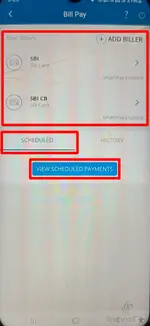
Billers added by you will always be visible to you. Whether they are added to scheduled or not is a hit or miss. One the home page of the app click "Bill Payments", there you should see your added billers. And then when you click View Scheduled Payments, you will see your billers scheduled for payment.

1764417861715.webp 1764418274047.webp
 
I still think after bill generation date, if bill is not scheduled within 3 working days then it will not be scheduled for that billing cycle. At least this is my experience. So you need to find some other ways to pay bob bills. Check next month if bill gets fetched and scheduled or not.
Or you can delete bob biller and again add same freshly.

Also, it should not matter if you are using new/old netbanking or mobile app. You asked how to see added billers. I can guide for new netbanking how to check them. Login to netbanking -> Bills & Recharges -> On this screen check "My Bills". All bills appear horizontally. Check if bob bills appear there for you or not. If they appear and not scheduled then you need to wait for next bill to be scheduled. Once that period of scheduling bill passes, we can't control to reschedule it. (again this reply is about my experience of using HDFC Smartpay)
Thanks for the reply. I manually had to add the bob card biller again through net banking website and then the biller started to show up with the bill amount. And it also got paid today morning, i.e. one day before the due date. So i think there is might be some glitch because of it biller added through mobile app wasn't showing up.
 
Billers added by you will always be visible to you. Whether they are added to scheduled or not is a hit or miss. One the home page of the app click "Bill Payments", there you should see your added billers. And then when you click View Scheduled Payments, you will see your billers scheduled for payment.

View attachment 115302View attachment 115305
Yes. It started showing up once i added again through net banking website.
 
Back
Top